Introduction
Fancy Framework is a free WordPress plugin that installs, edits and updates a design token system — colors, spacing, typography, shape — directly in Bricks' or Etch's own native storage: Bricks' global variables and color palette, or a «Fancy Framework» variable collection in Etch. There is no plugin-owned copy of the tokens to fall out of sync with what the builder actually has.
The tokens themselves started as a generator at fancyframework.com, whose output you used to paste into Bricks by hand. The plugin does that installation for you, and then gives you a settings panel to keep editing the system afterwards — without regenerating anything, and with a preview, a review and an undo on every change.
If you deactivate or delete the plugin, nothing on your site changes. The tokens it wrote stay exactly where they are, in Bricks' or Etch's own storage. The plugin edits that storage; it does not replace it or sit in front of it.
What it gives you
- A settings panel, reachable from the front-end admin bar, from inside the Bricks builder, and from its own wp-admin screen — the same panel in all three places, picking up where you left it.
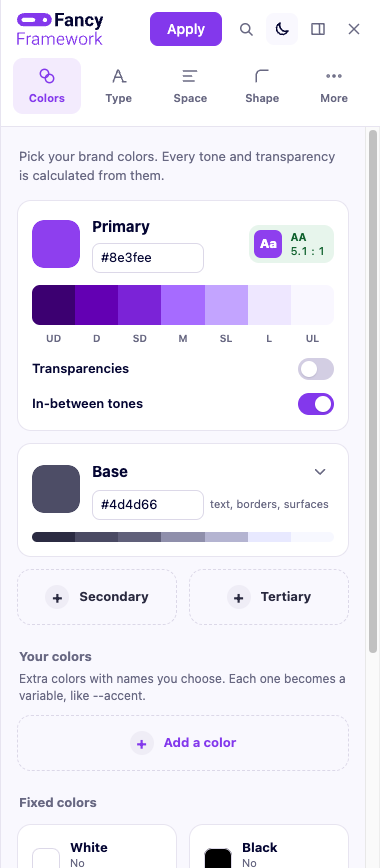
- Colors with calculated tone scales (a full light-to-dark ramp from one brand color, with guaranteed contrast) and per-color transparencies.
- Spacing and sizing by role — fluid between your smallest and largest screen, no breakpoints to maintain.
- Typography for body text and each heading level, independently.
- Shape — border radius and shadows, for buttons and cards.
- A base CSS layer that fixes what the builder leaves out: a keyboard focus ring that is never accidentally removed, anchor links that stop below a fixed header, lists and links that behave, and a few more.
- An accessibility seal that checks the design system's own variables against WCAG 2.2 AA — contrast, focus, text that grows with browser zoom, button size on phones — and tells you exactly what passes and what does not.
- Five starting personalities (Editorial, Tech, Soft, Corporate, Playful) that set type, line height, weight, radius and shadow together, in one click.
- A visual history of every applied version, to go back to an earlier look with one click.
- Your own AI assistant, connected over MCP, which can read the design system and propose changes for you to review — or, only if you turn that on, apply them live while you watch.
What it is not
It is not a utility-class framework. It does not generate CSS classes for you to apply to elements, and it does not touch your markup or your layout. It manages variables — the values your own classes and Bricks' or Etch's own controls already read from.
It also never touches anything it did not create: your own variables, your color palette entries, your classes and your custom CSS are left exactly as they are. The one deliberate exception, always shown in the review before you apply, is explained in Base CSS.