Accessibility seal
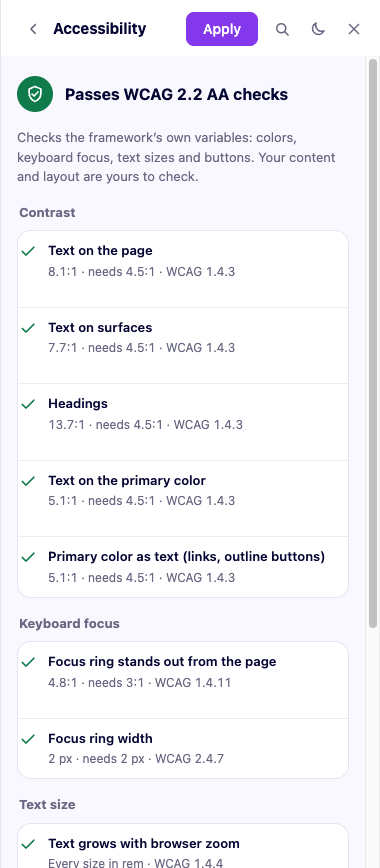
More → Accessibility in the panel checks the design system's own variables against WCAG 2.2 AA, with the values you actually have — not a generic rule of thumb — and shows you exactly what passes and what does not.
What it checks
| Group | Checks | Needs |
|---|---|---|
| Contrast | Text on the page and on surfaces, headings, text on the primary color (and secondary/tertiary, if you use them), the primary color used as text (links, outline buttons) | 4.5:1 |
| Keyboard focus | The focus ring stands out from the page and from surfaces; its width | 3:1 · 2 px |
| Text size | Every font size is in a unit that grows with the browser's zoom | — |
| Touch targets | A button's height on the smallest screen you support | 24 px |
A check that does not apply to your site — for instance, text-on-secondary contrast when you have not turned secondary on — is skipped, never counted as a failure.
What it does not check
Your content and your layout. The seal looks at the framework's variables, not at what you build with them — a low-contrast image overlay, a confusing form, or missing alt text are still yours to check. The panel says this plainly, next to the verdict, on purpose: a seal that overstated what it covers would not be worth trusting.
The report
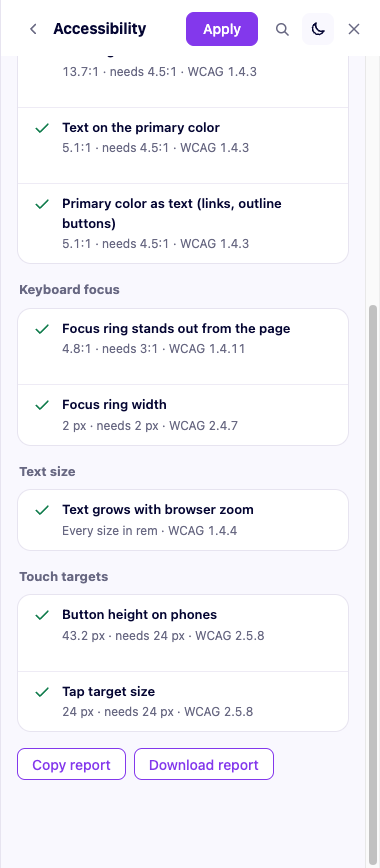
Each failing check links straight to the setting that would fix it. The whole report can be copied as text or downloaded as a page you can share — useful evidence for a client, or for yourself six months later. The wp-admin Overview tab shows the same verdict for whatever is currently applied, with a link into the panel.