Base CSS
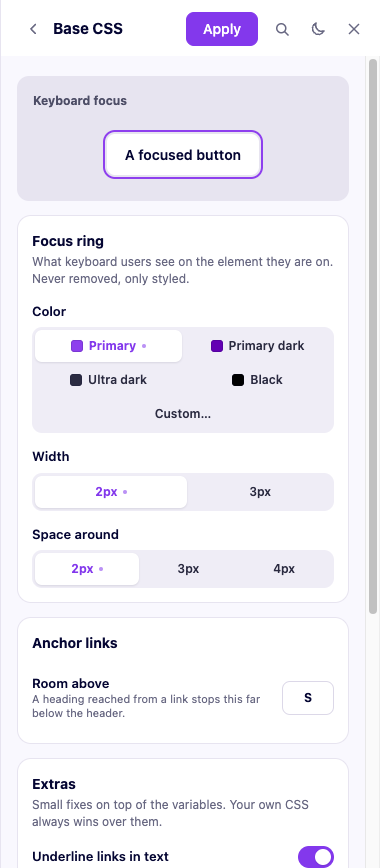
Variables alone do not make a page accessible or well-behaved — something still has to use them. The base CSS layer is a small, fixed set of rules that do that: a keyboard focus ring that is never accidentally hidden, anchor links that stop below a fixed header, headings that follow their own variables, lists that behave, and a couple of fixes for things the builder itself gets wrong.
Always on
- Keyboard focus. A focus ring in the color, width and offset you set in
the panel (More → Base CSS), on whatever element has keyboard focus.
It is written so that it can never be silently removed — not even by a
stray
outline: nonesomewhere else, the single most common accessibility regression on the web. - Anchor links. Scrolling to an anchor (
#section) stops with enough room below your fixed header, by the gap you set in the panel. - Headings and text. Each heading level follows its own size, line height and weight; body text follows its base size.
[hidden]actually hides. Builders commonly give an elementdisplay: flex, which silently cancels the nativehiddenattribute unless something re-assertsdisplay: nonefor it — this layer does.- Images and other media never overflow their container; form fields inherit the site's font instead of the browser's default one.
Optional modules
Each is a switch in More → Base CSS, on or off per site:
| Module | What it does | Default |
|---|---|---|
| Underlined links | Links inside a block of text, without a class, get an underline in your primary color | On |
| Clipped overflow | Sections never make the page scroll sideways (overflow-x: clip, which keeps position: sticky working — unlike hidden) | On |
| Styled lists | A list without a class gets a check mark in your primary color instead of a bullet | Off |
| Branded selection | Selected text uses your primary color | Off |
Unlike a color or a size, these modules are not part of the panel's live preview — the panel only previews variables. Toggling one shows up after you apply, on a real reload of the front end; the tab you already had open before applying will not update on its own.
Where it is written
On Bricks, in its own block of the site's custom CSS, between
/* fancy-framework:start */ and /* fancy-framework:end */ markers —
anything outside that block is yours, and the plugin never touches it. On
Etch, in its own global stylesheet.
Every rule is written at zero specificity (:where()), so your own CSS
always wins over it, with three deliberate exceptions: [hidden] always
hides (there is nothing to style around it); on a Bricks site that has
turned off its own cascade layer, text and heading rules use a plain element
selector instead, so they still win over Bricks' own element-level styles;
and branded selection, since ::selection is a pseudo-element and
:where() cannot wrap one — it keeps the lowest specificity CSS allows for
it, but your own ::selection rule, if you have one, still wins.
The old web CSS
If you used to paste fancyframework.com's own base CSS into Bricks' or Etch's custom CSS by hand, applying removes it — but only if it is still there exactly as the generator gave it to you. If you changed it, the plugin leaves it alone and the review warns you that it is still there and may override the new one.